
Building your own Language Models Is Now Easier Than Ever: Thanks to Frameworks Like TorchTitan

When I was building small language models, I was looking for frameworks that could simplify my task of building these models. At the same time, I was working on writing a book about language models, which meant I needed a framework that was both powerful enough for real training and educational enough to understand what was happening under the hood.
Book link
✅ Gumroad: https://plakhera.gumroad.com/l/BuildingASmallLanguageModelfromScratch
✅ Leanpub: https://leanpub.com/buildingasmalllanguagemodelfromscratch/
The landscape of training frameworks has evolved significantly. There are several options available, each with their own strengths and trade-offs. Let me share what I discovered during my exploration.
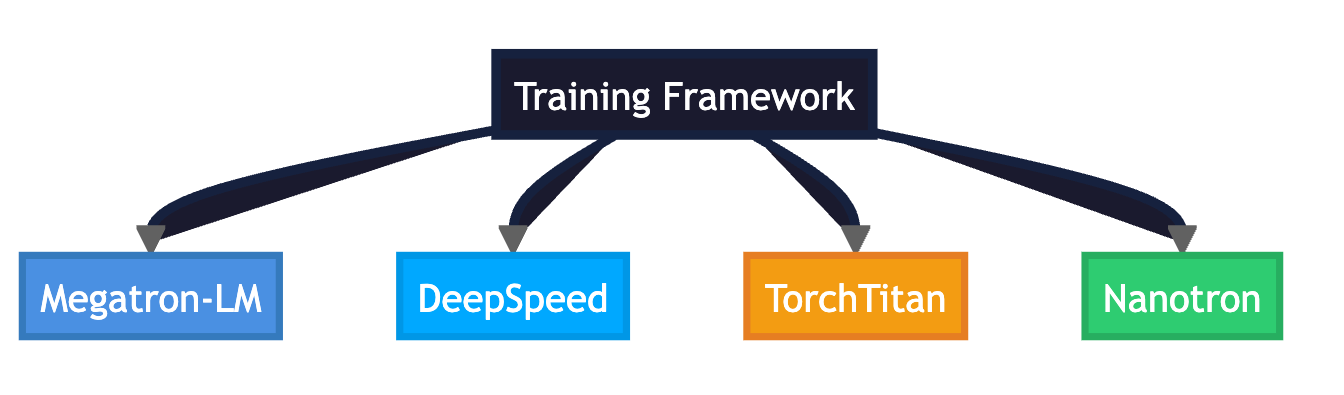
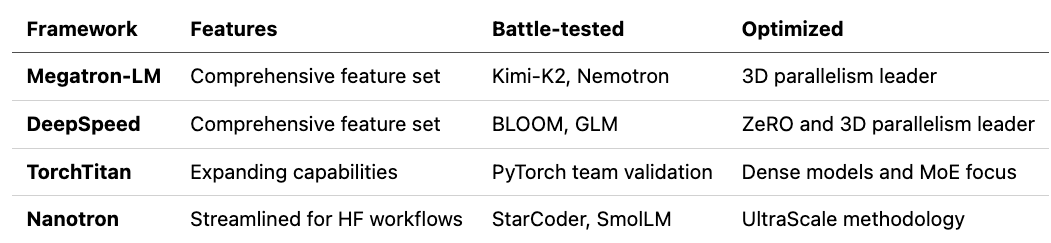
Megatron-LM from NVIDIA has been the industry standard for years. It’s what powers massive training runs for models like Kimi-K2 and Nemotron. The framework pioneered many of the 3D parallelism techniques we use today. However, when I tried to get started with it, I found the setup process quite complex. It requires a deep understanding of distributed systems and has a steep learning curve. For someone writing a book and trying to understand the fundamentals, it felt like too much abstraction was hiding the important details.
DeepSpeed from Microsoft caught my attention because of its ZeRO optimizer, which dramatically reduces memory requirements. It’s been used to train models like BLOOM and GLM, and has excellent integration with Hugging Face. The memory efficiency is impressive, but I found that for smaller models on single GPUs, some of its advanced features felt like overkill. The framework is excellent when you’re memory-constrained or working with very large models, but for my use case of building and understanding small language models, it added complexity I didn’t need.
Nanotron from Hugging Face is interesting because it’s minimal and tailored specifically for Hugging Face pretraining workflows. It’s been battle-tested with real models like StarCoder and SmolLM, and follows the UltraScale Playbook approach. The simplicity is appealing, but I wanted something that would let me dive deeper into the training mechanics, not just use a black box.
TorchTitan from the PyTorch team felt like the right fit for what I was trying to accomplish. It’s built natively in PyTorch, which means I could understand and modify the code if needed. The framework includes modern features like FSDP2 and MoE support, which are important for understanding current training practices. While it’s newer than Megatron-LM or DeepSpeed, it’s actively developed by the PyTorch team, which gives me confidence in its direction. Most importantly, it strikes a balance between being powerful enough for real training and transparent enough for learning https://github.com/pytorch/torchtitan
Why TorchTitan for Small Language Models?
For small to medium models (100M to 10B parameters) running on single or a few GPUs, TorchTitan offers an ideal combination. It provides access to modern PyTorch features without overwhelming complexity. The documentation is clear, the codebase is readable, and it’s actively maintained. Most importantly for my book-writing project, it allows me to see and understand what’s happening at each step of the training process, which is crucial for educational purposes.
The framework’s native PyTorch implementation means I can leverage the entire PyTorch ecosystem. When I need to debug something or understand a particular behavior, I can trace through the code and see exactly what’s happening. This transparency is invaluable when you’re trying to learn and teach others about how language model training actually works.
If you’re working with very large models (100B+ parameters) or need a framework that’s been battle-tested in production for years, you might consider Megatron-LM or DeepSpeed. But for learning, research, and building small to medium-sized models, TorchTitan offers the perfect balance of power and transparency.
Environment Setup
Google Colab Setup (Recommended for A100)
1: Install Dependencies
# Install PyTorch Nightly (required for latest TorchTitan features)
pip install --pre torch torchvision torchaudio --index-url https://download.pytorch.org/whl/nightly/cu124
# Install TorchTitan
git clone https://github.com/pytorch/torchtitan.git
cd torchtitan
pip install -e .
2: Download Tokenizer
You need a Hugging Face token to access Meta’s Llama models:
Get token from: https://huggingface.co/settings/tokens
Request access to: https://huggingface.co/meta-llama/Llama-4-Scout-17B-16E
# Set your HF token
export HF_TOKEN=”your_token_here”
# Download tokenizer
python scripts/download_hf_assets.py \
--repo_id meta-llama/Llama-4-Scout-17B-16E \
--hf_token $HF_TOKEN \
--local_dir ./assets/hf/Llama-4-Scout-17B-16E \
--assets tokenizer
NOTE: The tokenizer is shared across all Llama 4 models
3: Training Files Overview
TorchTitan’s training system consists of several key files that work together:
1. Main Training Script: torchtitan/train.py
Purpose: The core training engine that orchestrates the entire training process.
What it does:
Initializes the training environment and distributed setup
Loads model, tokenizer, and dataset based on config
Manages the training loop (forward pass, backward pass, optimization)
Handles checkpointing (saving/loading model states)
Tracks metrics (loss, learning rate, memory usage, TPS, MFU)
Coordinates distributed training across multiple GPUs
Manages data loading and preprocessing
Key components:
Trainer class: Main training orchestrator
train_step(): Executes one training step
forward_backward_step(): Performs forward and backward passes
Checkpoint management: Saves/loads model states
Metrics collection: Tracks training progress
Usage: You don’t modify this file - it reads your config and runs training accordingly.
2. Training Configuration File: colab_a100.toml
Purpose: Defines all training parameters, model settings, and hyperparameters.
Location: torchtitan/models/llama4/train_configs/colab_a100.toml
What it configures:
Model architecture (size, layers, dimensions)
Training parameters (batch size, sequence length, steps)
Optimizer settings (learning rate, weight decay)
Learning rate schedule (warmup, decay)
Parallelism settings (data parallel, tensor parallel, etc.)
Checkpointing strategy (when to save, what to save)
Memory optimization (activation checkpointing)
Why separate the config file?
Easy to experiment with different settings
No code changes needed to adjust training
Version control friendly (track config changes)
Shareable across team members
NOTE: This model was trained using my own custom file https://github.com/ideaweaver-ai/torchtitan/blob/main/colab_a100.toml
3. Model Definition Files
Location: torchtitan/models/llama4/
Key files:
model/model.py: Transformer architecture implementation
Transformer class: Main model
TransformerBlock: Single transformer layer
Attention: Multi-head attention with RoPE
FeedForward: SwiGLU with MoE support
model/args.py: Model configuration and arguments
TransformerModelArgs: Model size definitions
update_from_config(): Updates model args from training config
__init__.py: Model registry
llama4_args: Dictionary of model flavors (debugmodel, 17bx16e, etc.)
get_train_spec(): Returns training specification for the model
4. Supporting Training Files
torchtitan/components/checkpoint.py: Checkpoint management
CheckpointManager: Handles saving/loading checkpoints
Supports DCP (Distributed Checkpoint) format
Handles Hugging Face format conversion
torchtitan/components/optimizer.py: Optimizer management
OptimizersContainer: Manages optimizer state
Supports AdamW, SGD, and other optimizers
torchtitan/components/tokenizer.py: Tokenizer handling
HuggingFaceTokenizer: Wraps HF tokenizers
Handles tokenization and detokenization
torchtitan/components/dataloader.py: Data loading
DataLoader: Manages dataset loading and preprocessing
Handles distributed data loading
How training files work together
┌─────────────────────────────────────────────────────────┐
│ 1. You run: torchrun ... train.py --config colab_a100.toml │
└─────────────────────────────────────────────────────────┘
↓
┌─────────────────────────────────────────────────────────┐
│ 2. train.py reads colab_a100.toml │
│ - Parses TOML config │
│ - Extracts model, training, optimizer settings │
└─────────────────────────────────────────────────────────┘
↓
┌─────────────────────────────────────────────────────────┐
│ 3. train.py initializes components: │
│ - Loads model from models/llama4/model/model.py │
│ - Loads tokenizer from assets/hf/... │
│ - Sets up optimizer from components/optimizer.py │
│ - Configures checkpointing from components/checkpoint │
└─────────────────────────────────────────────────────────┘
↓
┌─────────────────────────────────────────────────────────┐
│ 4. Training loop runs: │
│ - Forward pass (model forward) │
│ - Backward pass (gradient computation) │
│ - Optimizer step (weight update) │
│ - Checkpoint saving (periodic) │
│ - Metrics logging (loss, TPS, MFU) │
└─────────────────────────────────────────────────────────┘
↓
┌─────────────────────────────────────────────────────────┐
│ 5. Outputs saved to: │
│ - outputs/checkpoint/step-XXX/ (model checkpoints) │
│ - outputs/tb/ (TensorBoard logs) │
│ - Console output (training metrics) │
└─────────────────────────────────────────────────────────┘
Training Command
torchrun --nproc_per_node=1 --rdzv_backend=c10d --rdzv_endpoint=localhost:0 torchtitan/train.py --job.config-file torchtitan/models/llama4/train_configs/colab_a100.toml
Output
python load_and_test_model.py \
--config torchtitan/models/llama4/train_configs/colab_a100.toml \
--checkpoint ./outputs/checkpoint/step-9500 \
--prompt “Once upon a time” \
--max_new_tokens 100 \
--temperature 0.8
======================================================================
Generating text...
Prompt: Once upon a time
======================================================================
======================================================================
Generated Text:
======================================================================
Once upon a time, the rest of the college (4pm) would be a few weeks to ensure that the online college involves Sanctuary, which means more than 10 minutes to be added to the my classroom.
Become the antiques with all the jobs to imagine and the chance to build.
It will make a chicken, and the amount will require a great deal.
Anyone will be nervous about a diet, which means that they are not limited to counting the same temperature, which is quick and wreck it on the pot
======================================================================
Limitations
While TorchTitan is powerful and accessible, it’s important to understand its limitations. TorchTitan currently supports only a handful of model architectures:
Llama 3 (
llama3) - Meta’s Llama 3 architectureLlama 3 Fine-tuned (
llama3_ft) - Llama 3 with fine-tuning supportLlama 4 (
llama4) - Meta’s latest Llama architecture with MoEQwen 3 (
qwen3) - Alibaba’s Qwen architectureDeepSeek V3 (
deepseek_v3) - DeepSeek’s V3 architectureFlux (
flux) - Stability AI’s Flux architecture
Which means
You cannot train arbitrary model architectures out of the box
If you want to train a model not in this list, you’ll need to implement it yourself
The framework is optimized for these specific architectures
Each supported model has been carefully integrated with the training infrastructure
If you need to train a different architecture, you would need to:
Implement the model following TorchTitan’s protocols
Create a state dict adapter for Hugging Face compatibility
Define parallelism strategies if needed
Create training configs
This is non-trivial work and requires a deep understanding of both the model architecture and TorchTitan’s internals.
Scale Limitations: While TorchTitan supports distributed training, it’s optimized for small to medium-scale training (models up to ~100B parameters). For extremely large models (500B+ parameters) or massive multi-node clusters, frameworks like Megatron-LM might be more appropriate.
Summary
One of the most remarkable aspects of modern training frameworks like TorchTitan is how they’ve democratized model training. What used to require teams of engineers and months of infrastructure setup can now be accomplished by a single person in a matter of hours.
The heavy lifting is done for you
TorchTitan handles all the complex, error-prone parts of training:
Distributed Training Complexity: You don’t need to manually manage process groups, handle communication between GPUs, or worry about synchronization. TorchTitan’s parallelism abstractions let you configure multi-GPU training with simple config changes.
Memory Management: The framework automatically handles gradient accumulation, activation checkpointing, and mixed precision training. You can train models that are much larger than your GPU memory would normally allow.
Checkpointing and Recovery: Training interruptions are no longer catastrophic. TorchTitan’s checkpoint system automatically saves your progress, handles resuming from failures, and can even convert checkpoints to Hugging Face format for easy sharing.
Optimization and Scheduling: The framework includes battle-tested optimizers and learning rate schedulers. You get the benefits of years of research in optimization without implementing it yourself.
Metrics and Monitoring: Training metrics like loss, throughput (TPS), and model flop utilization (MFU) are automatically tracked and logged. You can visualize training progress with TensorBoard without writing any additional code.
What you actually need to do
With TorchTitan, building your own model comes down to:
Choose a model architecture (from the supported models)
Create a TOML config file (define hyperparameters)
Run the training command (one line)
Wait for training to complete (monitor progress)
That’s it. No need to write training loops, handle distributed communication, manage memory, or implement checkpointing. The framework does all of that for you.